FX ROS System Integration Overview
Overview
BATCAM FX supports ROS 2-based data transmission starting from development firmware v1.0.3b, and the feature is included in official release firmware v1.0.3. This document shows you how to subscribe to the ROS 2 topics that BATCAM FX publishes (beamforming map, audio, video, PRPD classification results) from a ROS 2 node on your host PC, and how to control beamforming and overlay settings with ROS 2 actions.
The ROS 2 data channel operates independently of the existing data channels (RTSP video, WebSocket/Protobuf). For the existing data channels, see the BATCAM FX Overview document.
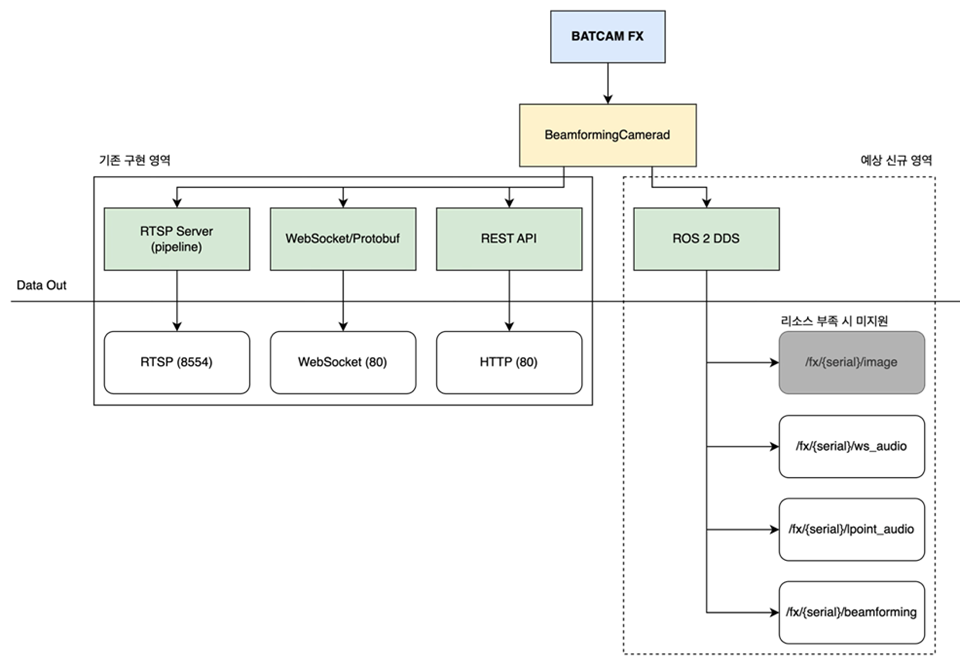
BATCAM FX uses the FX Stream Message types for data transmission. The camera firmware includes a binary built on ROS 2 Humble Hawksbill, and the message format is defined in detail in the following public repository.
These messages are defined as ROS 2 interface types and are used to publish the data collected by the sensor.
This document covers the following.
-
Covered: prerequisites (firmware, ROS 2 environment, network), quick start (build and subscription check), topic/message specifications, action specifications, troubleshooting
-
Not covered: RTSP/WebSocket channel integration (BATCAM FX Overview), REST API details (FX API Playground), detailed ROS Domain ID change procedure (ROS Domain ID Configuration)
Prerequisites
Firmware Versions
ROS 2 features were added incrementally across firmware versions. For the full change history, see the FX Firmware Release Notes.
| Feature | First Supported Firmware | Notes |
|---|---|---|
| ROS 2 topic transmission (beamforming / image / lpoint_audio / ws_audio / prpd) | v1.0.3b (development firmware) | Included in official release v1.0.3 |
| Setting actions (setting_beamforming / setting_overlay) | v1.0.3c | Included in official release v1.0.3 |
ROS Domain ID query/set REST API (/ros/domain) | v1.0.3c | ROS Domain ID Configuration |
You can check your camera’s firmware version with the REST API GET /setting/status (device information query). For the detailed specification, see the FX API Playground.
ROS 2 Environment
| Category | Environment | Notes |
|---|---|---|
| Camera (binary embedded in firmware) | ROS 2 Humble Hawksbill | Included in the firmware; no separate installation needed |
| Host message package (fx-stream-msgs) | Assumes ROS 2 Humble | Verified by building in a Python 3.10.16, ROS 2 Jazzy (Ubuntu 24.04) environment and testing data transmission and reception with BATCAM FX |
💡 Note: fx-stream-msgs is written for use with ROS 2 Humble, and it has been verified through builds in a ROS 2 Jazzy (Ubuntu 24.04) environment and data transmission/reception tests with BATCAM FX.
Network
-
The camera’s ROS 2 stack uses a UDPv4-based Fast DDS configuration (as of the v1.0.3c release notes). The camera and the host PC must be able to communicate with each other on the same network.
-
Topics are visible only when the camera and the host use the same
ROS_DOMAIN_ID. Starting from development firmware v1.0.3b, the camera’s default ROS_DOMAIN_ID is123, and on firmware 1.0.3c and later it can be queried and changed via the REST API (GET/PATCH /ros/domain). For details, see the ROS Domain ID Configuration document. -
Subscribing to all topics requires about 3.6 MB/s of bandwidth for the fx_stream_msgs topics combined (excluding the image topic). A wired connection is recommended for stable reception.
Quick Start
1. Check the camera hardware_id
BATCAM FX topic and action names include the camera’s hardware ID (e.g. /fx_{hardware_id}/beamforming). You can find the hardware ID with the REST API GET /setting/status. All REST endpoints require HTTP Basic authentication (see the FX API Playground).
curl -u admin:{password} http://192.168.0.30/setting/status# Replace the IP address and password with values for your environment.Example response:
{ "error": 0, "result": { "hardware_id": "3287162925128", "sbrio_version": "1.0.14", "firmware_version": "v0.0.1" }}For the camera in this example, the topic prefix is /fx_3287162925128. All examples in the steps below use this value.
2. Set the host ROS_DOMAIN_ID
In the host shell, set the same domain ID as the camera. You can check the value configured on the camera with GET /ros/domain (firmware 1.0.3c and later); starting from development firmware v1.0.3b, the default is 123.
export ROS_DOMAIN_ID=123# Set this to the same value configured on the camera.3. Build fx-stream-msgs
To use the fx_stream_msgs message types on the host, clone the public repository and build it in a workspace.
mkdir -p ~/fx_ws/srccd ~/fx_ws/srcgit clone https://gitlab.com/smins-oss/sound-camera/framework/protocol/fx-stream-msgs.gitcd ~/fx_wscolcon buildsource install/setup.bashEach time you open a new terminal, run source ~/fx_ws/install/setup.bash again.
4. Check topics and actions
With the camera powered on and connected to the network, check the topic list.
ros2 topic listExpected output:
/fx_3287162925128/beamforming/fx_3287162925128/image/fx_3287162925128/lpoint_audio/fx_3287162925128/prpd/fx_3287162925128/ws_audio/parameter_events/rosoutYou can also check the action list.
ros2 action listExpected output:
/fx_3287162925128/setting_beamforming/fx_3287162925128/setting_overlay5. Verify data reception
Try receiving a single message from the PRPD topic.
ros2 topic echo /fx_3287162925128/prpd --onceExpected output (values vary with measurement conditions):
noise:- -0.96- 4.48- -6.54corona:- 2.98- 5.88- -1.39floating:- -3.55- -5.45- 0.73surface:- 0.3- -1.51- 0.45---Each array contains logit scores per partial discharge type, corresponding to LPoint channels CH0~CH2. For how to interpret them, see the AI PRPD Classifier document.
6. Minimal subscriber node example (Python)
The following is a complete, minimal node example that subscribes to the Beamforming topic and prints the maximum value of the BF Map.
fx_beamforming_listener.py
import rclpyfrom rclpy.node import Nodefrom fx_stream_msgs.msg import Beamforming
HARDWARE_ID = '3287162925128'  # Replace with the value obtained from GET /setting/status
class FxBeamformingListener(Node):    def __init__(self):        super().__init__('fx_beamforming_listener')        self.subscription = self.create_subscription(            Beamforming,            f'/fx_{HARDWARE_ID}/beamforming',            self.listener_callback,            10)
    def listener_callback(self, msg: Beamforming):        # bf is the 40x30 BF Map flattened into a 1x1200 array;        # on firmware v1.0.2 and later the values are dB values that need no scale conversion.        self.get_logger().info(            f'BF max: {max(msg.bf):.1f} dB (gain={msg.gain})')
def main():    rclpy.init()    node = FxBeamformingListener()    rclpy.spin(node)
if __name__ == '__main__':    main()
Run:
source ~/fx_ws/install/setup.bashpython3 fx_beamforming_listener.pyExpected output (values vary with measurement conditions):
[INFO] [fx_beamforming_listener]: BF max: 45.2 dB (gain=100.0)[INFO] [fx_beamforming_listener]: BF max: 45.4 dB (gain=100.0)Topic Reference
BATCAM FX creates the following topics based on the camera’s hardware ID.
| Topic | Message Type | Rate | Average Bandwidth | Size per Message |
|---|---|---|---|---|
/fx_{hardware_id}/beamforming | fx_stream_msgs/msg/Beamforming | 25 Hz | ~250 KB/s | 9.84 KB |
/fx_{hardware_id}/image | sensor_msgs/msg/CompressedImage | 25 Hz (25 fps) | — | — |
/fx_{hardware_id}/lpoint_audio | fx_stream_msgs/msg/LPointAudio | 25 Hz | ~2.5 MB/s | 0.10 MB |
/fx_{hardware_id}/ws_audio | fx_stream_msgs/msg/WsAudio | 25 Hz | ~850 KB/s | 32.02 KB |
/fx_{hardware_id}/prpd | fx_stream_msgs/msg/Prpd | 25 Hz | ~220 B/s | 52 B |
All messages except LevelTrigger are published periodically at 25 Hz (25 fps). The combined average bandwidth of the fx_stream_msgs topics is about 3.6 MB/s (excluding the image topic).
Data Interpretation Notes
-
WsAudio,LPointAudio,Beamformingmessages include a gain value; when the camera’s autogain feature is enabled, the last configured value or-1is returned. -
WsAudio,LPointAudio— the ws and lpoint0~2 values are float arrays of 8000 samples in IEEE 754 Float Wave Format. At the 25 Hz publish rate this equals 200,000 samples per second, matching the camera’s microphone sampling rate (200 kHz). -
Starting from firmware v1.0.2, the
Beamformingmessage’sbfvalues are dB values that require no scale conversion.
WsAudio.msg
| Type | Name | Description |
|---|---|---|
| float64 | gain | Microphone gain value at the time of reception. With autogain active, the last configured value or -1 |
| float32[] | ws | Audio signal of 8000 samples (IEEE 754 Float Wave Format) |
LPointAudio.msg
| Type | Name | Description |
|---|---|---|
| float64 | gain | Microphone gain value at the time of reception. With autogain active, the last configured value or -1 |
| float32[] | lpoint0 | Audio signal beamformed at the Listening Point 0 position, 8000-sample float array (IEEE 754 Float Wave Format) |
| float32[] | lpoint1 | Audio signal at the Listening Point 1 position (same format) |
| float32[] | lpoint2 | Audio signal at the Listening Point 2 position (same format) |
For the Listening Point coordinate system and configuration constraints, see the Listening Point Coordinates document.
Beamforming.msg
| Type | Name | Description |
|---|---|---|
| float64 | gain | Microphone gain value at the time of reception. With autogain active, the last configured value or -1 |
| float64[] | bf | The 40×30 BF Map flattened into a 1×1200 array. From firmware v1.0.2, dB values that require no scale conversion (see BF Map Structure and Coordinate System) |
| float64[] | level | — |
| int32[] | param1 | — |
| int32[] | param2 | — |
| int32[] | theta | — |
| int32[] | pos_x | — |
| int32[] | pos_y | — |
| int32[] | v_pos_x | — |
| int32[] | v_pos_y | — |
Prpd.msg
Each field is an array of length 3 corresponding to LPoint channels CH0~CH2, and the values are unnormalized logit scores for each partial discharge type. For interpretation using argmax/softmax and example code, see the AI PRPD Classifier document.
| Type | Name | Description |
|---|---|---|
| float32[3] | noise | Per-channel Noise (non-discharge noise) logit score |
| float32[3] | corona | Per-channel Corona discharge logit score |
| float32[3] | floating | Per-channel Floating discharge logit score |
| float32[3] | surface | Per-channel Surface discharge logit score |
LevelTrigger.msg (not planned for use)
This type is defined as a message but is not planned for use, and it is not included in the topic list above.
| Type | Name | Description |
|---|---|---|
| float64 | decibel | Level value (dB) |
Action Reference
BATCAM FX creates the following actions based on the camera’s hardware ID (firmware v1.0.3c and later).
| Action | Action Type | Purpose |
|---|---|---|
/fx_{hardware_id}/setting_beamforming | fx_stream_msgs/action/BeamformingSetting | Set beamforming parameters |
/fx_{hardware_id}/setting_overlay | fx_stream_msgs/action/OverlaySetting | Set overlay image generation parameters and source mode |
For detailed examples of configuring settings with actions, see the Beamforming and Overlay Configuration via ROS Actions (Beta) document. The same settings can also be made through the REST API (FX API Playground).
BeamformingSetting.action
Goal, Result, and Progress all consist of a single BeamformingSetting message-type setting field.
| Section | Type | Name |
|---|---|---|
| Goal | BeamformingSetting | setting |
| Result | BeamformingSetting | setting |
| Progress | BeamformingSetting | setting |
BeamformingSetting.msg — for each field’s minimum/maximum/reference values, see the Beamforming Parameters document.
| Type | Name | Description | Range (unit/step) |
|---|---|---|---|
| bool | autogain | Whether to use automatic microphone gain. The camera determines the gain automatically based on sound level | True / False |
| float64 | gain | Microphone gain value. Applied only when autogain is False | 1 ~ 1000 (only 1, 10, 100, 1000 allowed) |
| float64 | x_cal | Corrects the x-coordinate offset between the camera image and the overlay image | 0 ~ 1 (step 0.01) |
| float64 | y_cal | Corrects the y-coordinate offset between the camera image and the overlay image | 0 ~ 1 (step 0.01) |
| float64 | distance | Distance to the noise source to measure. Attempts more precise beamforming at the specified distance | 1 ~ 10 (step 1) |
| float64 | high_cut | Maximum frequency to display (low-pass filter). Sounds above this value are filtered out | Above low_cut ~ 100,000 Hz (step 100) |
| float64 | low_cut | Minimum frequency to display (high-pass filter). Sounds below this value are filtered out | 1,000 Hz ~ below high_cut (step 100) |
| int32 | l_point_0 | Index of Listening Point 0 (40×30 grid). All three must be specified | 0 ~ 1199 |
| int32 | l_point_1 | Index of Listening Point 1 | 0 ~ 1199 |
| int32 | l_point_2 | Index of Listening Point 2 | 0 ~ 1199 |
For coordinate constraints such as the minimum distance between Listening Points, see the Listening Point Coordinates document. In the REST API, the same values are sent in the index_l field (three comma-separated values).
Terminal example:
ros2 action send_goal /fx_3287162925128/setting_beamforming fx_stream_msgs/action/BeamformingSetting \"{setting: {autogain: false,gain: 1,x_cal: 0.0,y_cal: 0.0,distance: 5.0,high_cut: 60000.0,low_cut: 25000.0,l_point_0: 580,l_point_1: 20,l_point_2: 290}}"OverlaySetting.action
Goal, Result, and Progress all consist of a single OverlaySetting message-type setting field.
| Section | Type | Name |
|---|---|---|
| Goal | OverlaySetting | setting |
| Result | OverlaySetting | setting |
| Progress | OverlaySetting | setting |
OverlaySetting.msg — for each field’s minimum/maximum/reference values, see the Overlay Parameters document.
| Type | Name | Description | Range (unit/step) |
|---|---|---|---|
| bool | enable_overlay | Whether to output the overlay image. When True, the overlay is drawn on images delivered over RTSP and ROS | True / False |
| bool | enable_source_mode | Source detection mode. Available only while the overlay is enabled | True / False |
| int32 | number_of_sources | Number of sources to track simultaneously (3 or fewer recommended) | 1 ~ 5 (step 1) |
| int32 | average | Number of beamforming maps to average. Not applied while source detection mode is active | 0 ~ 10 (step 1) |
| float64 | threshold | Minimum intensity to be considered a source. Not applied while source detection mode is active | 0 ~ 120 (step 1) |
| float64 | range | Overlay image size for each source. Not applied while source detection mode is active | 0 ~ 10 (step 0.1) |
Terminal example:
ros2 action send_goal /fx_3287162925128/setting_overlay fx_stream_msgs/action/OverlaySetting \"{setting: {enable_overlay: true,enable_source_mode: true,number_of_sources: 3,range: 5.0,threshold: 15.0,average: 1}}"Troubleshooting
-
Topics do not appear in the list:
-
Check that the host’s
ROS_DOMAIN_IDmatches the camera’s setting. From development firmware v1.0.3b the camera default is123, and you can check the current value withGET /ros/domain(firmware 1.0.3c and later). (ROS Domain ID Configuration) -
Check that the camera and the host can communicate on the same network. The camera’s ROS 2 stack uses a UDPv4-based Fast DDS configuration.
-
Check with
GET /setting/statusthat the firmware version supports ROS 2 transmission (topic transmission is available from development firmware v1.0.3b and included in official release v1.0.3).
-
-
You get an error that the fx_stream_msgs message types cannot be found:
-
Make sure you built the fx-stream-msgs package and ran
source ~/fx_ws/install/setup.bashin the current terminal. -
ros2 interface show fx_stream_msgs/msg/Beamforminglets you check that the type is recognized. -
fx-stream-msgs assumes ROS 2 Humble; it has been verified with build and transmission/reception tests in a ROS 2 Jazzy (Ubuntu 24.04) environment.
-
-
The gain value is received as
-1:- This is normal behavior when the camera’s autogain feature is enabled. To use a fixed gain value, set
autogainto False and then specify the gain (Beamforming Parameters).
- This is normal behavior when the camera’s autogain feature is enabled. To use a fixed gain value, set
-
Reception is delayed or drops out:
- Subscribing to all topics requires about 3.6 MB/s of bandwidth for the fx_stream_msgs topics combined (excluding the image topic). Use a wired connection and subscribe only to the topics you need.
-
The camera connection drops right after changing the ROS Domain ID:
PATCH /ros/domainbriefly disconnects the camera while the setting is being applied. Reconnect after it takes effect.
Related Documents
-
ROS Domain ID Configuration — how to query and change the domain ID (REST API, plus manual setup on older versions)
-
Beamforming and Overlay Configuration via ROS Actions (Beta) — detailed examples of using the actions
-
Beamforming Parameters — ranges and reference values for beamforming settings
-
Overlay Parameters — ranges and reference values for overlay settings
-
Listening Point Coordinates — BF Map structure and the LPoint index scheme
-
AI PRPD Classifier — how to interpret Prpd messages, with example code
-
FX Firmware Release Notes — ROS feature change history by version
-
FX API Playground — REST API reference (
/setting/status,/ros/domain, etc.) -
SMI OSS - fx-stream-msgs — message and action type definitions (public repository)